
Vector Artwork for DTG Printing: Complete Design Guide
Vector Artwork for DTG Printing Have you ever designed a graphic that looked amazing on your computer but came out blurry or pixelated when printed on a T-shirt? It’s a common frustration, and in...

Vector Artwork for DTG Printing
Have you ever designed a graphic that looked amazing on your computer but came out blurry or pixelated when printed on a T-shirt? It’s a common frustration, and in many cases, the problem starts with the artwork itself.
Table Of Content
- Sharp and Clean Edges
- Easy Resizing
- Better Color Accuracy
- Simplified Design Editing
- Vector Formats
- Print-Ready Formats
- Use High-Quality Original Artwork
- Convert Text to Outlines
- Keep Colors Organized
- Avoid Extremely Thin Lines
- Use Transparent Backgrounds
- Quick Checklist
- 1. What is vector artwork for DTG printing?
- 2. Is vector artwork required for DTG printing?
- 3. What file format is best for DTG printing?
- 4. Can I convert a low-quality image into vector artwork?
- 5. Why choose Digitizing Buddy for vector artwork?
Using vector artwork for DTG printing is one of the best ways to create clean, professional-looking apparel designs. Whether you’re launching a clothing brand, fulfilling customer orders, or printing custom merchandise, high-quality artwork can make all the difference.
In this guide, you’ll learn what vector artwork is, why it matters for Direct-to-Garment (DTG) printing, and how to prepare your files for the best possible results.
What Is Vector Artwork for DTG Printing?
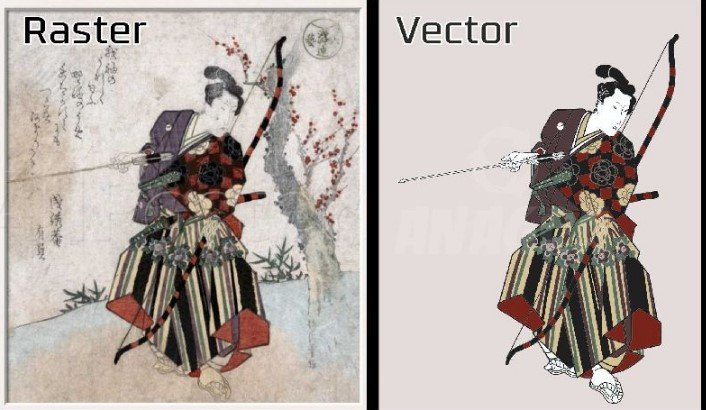
Vector artwork for DTG printing refers to artwork created using mathematical paths instead of pixels. Unlike raster images, vector graphics can be resized without losing quality.
This means your design stays sharp whether it’s printed on a small pocket logo or a large back graphic.
Common vector artwork includes:
- Company logos
- Typography designs
- Icons
- Line art
- Geometric illustrations
- Custom graphics
Although DTG printers typically print raster files, starting with vector artwork ensures maximum clarity and flexibility during file preparation.
Why Vector Artwork Matters for DTG Printing
A great print begins with a great design file.
Using vector artwork offers several advantages that improve both print quality and production efficiency.
Sharp and Clean Edges
Vector graphics maintain crisp outlines regardless of size.
This is especially important for:
- Bold text
- Fine lines
- Logos
- Graphic illustrations
Clean edges help create professional-looking apparel.
Easy Resizing
One of the biggest benefits of vector artwork is scalability.
You can enlarge or reduce your design without worrying about blurry edges or pixelation.
This flexibility makes it perfect for printing on:
- T-shirts
- Hoodies
- Tote bags
- Sweatshirts
- Promotional apparel
Better Color Accuracy
Vector designs use clearly defined shapes and color areas.
This helps maintain consistent colors throughout the printing process, producing vibrant and polished results.
Simplified Design Editing
Need to change a color, adjust text, or resize a logo?
Vector artwork allows quick edits without rebuilding the entire design.
This saves valuable production time.
Understanding DTG Printing
Direct-to-Garment (DTG) printing applies water-based ink directly onto fabric using specialized printers.
Unlike screen printing, DTG is ideal for:
- Small production runs
- Full-color artwork
- Detailed graphics
- Photo-quality images
- Custom orders
Because DTG captures fine detail, using clean artwork becomes even more important.
Best File Types for DTG Artwork
When preparing designs, understanding file formats helps ensure smooth printing.
Common file types include:
Vector Formats
- AI
- EPS
- SVG
These preserve editable vector information.
Print-Ready Formats
- PNG (transparent background)
- TIFF
- High-resolution PSD
These are often exported from vector artwork before printing.
Tips for Creating Better Vector Artwork for DTG Printing
Small improvements during the design stage can significantly improve your final print.
Use High-Quality Original Artwork
Always begin with clean artwork instead of low-resolution internet images.
A strong foundation produces better print results.
Convert Text to Outlines
Converting fonts into outlines prevents missing font issues when sharing files.
It also ensures consistent appearance across devices.
Keep Colors Organized
Limit unnecessary color variations.
Well-organized color layers simplify editing and production.
Avoid Extremely Thin Lines
Very thin strokes may not print clearly on fabric.
Slightly thicker lines often produce cleaner results.
Use Transparent Backgrounds
When exporting your design for DTG printing, use transparent backgrounds whenever possible.
This keeps the focus on the artwork rather than unwanted background colors.
Common Mistakes to Avoid
Even experienced designers sometimes overlook important details.
Avoid these common mistakes:
- Using low-resolution artwork
- Enlarging small raster images
- Forgetting transparent backgrounds
- Leaving fonts unconverted
- Using overly complex details
- Ignoring print size requirements
Correcting these issues before printing saves time and reduces waste.
When Professional Vector Artwork Makes a Difference
While simple graphics can often be created independently, professional vector artwork is valuable for more detailed projects.
Professional artwork is recommended for:
- Company branding
- Detailed logos
- Custom apparel collections
- Promotional products
- Sports uniforms
- Event merchandise
Professionally prepared artwork ensures every detail prints cleanly and consistently.
Why Choose Digitizing Buddy?
At Digitizing Buddy, high-quality vector artwork is created with precision and attention to detail.
Whether you need logo vectorization, custom illustrations, or print-ready artwork, every file is carefully prepared to deliver excellent DTG printing results.
Professional artwork helps reduce production problems, improve print quality, and create apparel that customers will love.
Best Practices Before Sending Artwork to Print
Before submitting your design, take a few minutes to review it.
Quick Checklist
- Verify artwork dimensions.
- Use high-resolution exports.
- Check transparent backgrounds.
- Confirm color accuracy.
- Convert text to outlines.
- Review alignment and spacing.
- Save a backup copy.
These simple steps help prevent costly printing mistakes.
Conclusion
Using vector artwork for DTG printing is one of the smartest ways to achieve sharp, vibrant, and professional apparel designs. Because vector graphics remain scalable and easy to edit, they provide greater flexibility throughout the printing process.
Whether you’re creating custom T-shirts, promotional products, or branded apparel, investing in high-quality artwork leads to better prints and happier customers. At Digitizing Buddy, professionally prepared vector artwork helps ensure every design is ready for exceptional DTG printing results.
Frequently Asked Questions (FAQs)
1. What is vector artwork for DTG printing?
Vector artwork for DTG printing is artwork created with scalable paths rather than pixels, allowing designs to maintain sharp quality at any size.
2. Is vector artwork required for DTG printing?
DTG printers usually print raster files, but starting with vector artwork provides cleaner designs and higher-quality exported images.
3. What file format is best for DTG printing?
PNG with a transparent background is commonly used for DTG printing, while AI, EPS, SVG, and PDF are excellent source files for creating print-ready artwork.
4. Can I convert a low-quality image into vector artwork?
Yes. Professional vector conversion can recreate logos and graphics as scalable artwork, improving print quality significantly.
5. Why choose Digitizing Buddy for vector artwork?
Digitizing Buddy creates accurate, print-ready vector artwork designed for outstanding DTG printing quality, helping businesses produce clean, vibrant, and professional apparel.